CheckBridge prints the checks you marked "Print later" in QuickBooks Online on blank check stock, with the right bank, account number and MICR line for each account. Then it marks them printed in QuickBooks for you.
From $9/month · unlimited checks · no card needed to start · nothing to install
Sign in with Intuit. CheckBridge sees your bank accounts and every check or bill payment marked "Print later".
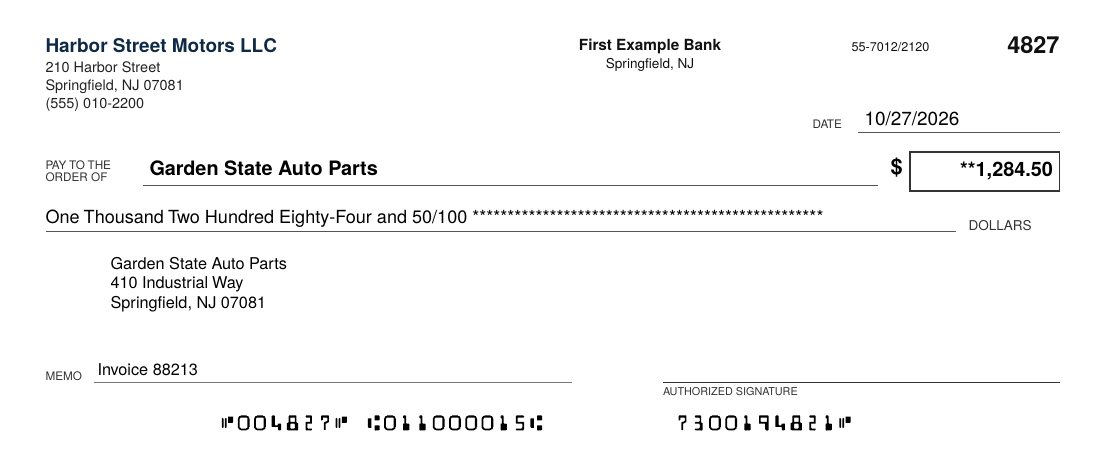
Type the routing and account number, or snap a photo of an existing check and CheckBridge reads the numbers for you.
Pick the checks, confirm the starting number, and print on any laser printer. Every account uses the same paper.
Once you confirm they printed, the check numbers go into QuickBooks and the checks are marked printed. Misprints go back in the queue.
Operating, payroll, escrow, a second company. Each prints with its own bank and MICR line on the same blank stock.
It runs in your browser, works on Mac and Windows, and connects straight to QuickBooks Online.
Add a logo, pick a font and accent color, choose check on top, middle or bottom, and add a second signature line.
Take a picture of one of your checks on your phone. The bank numbers fill in on your computer. The photo is read on your device.
Invite your bookkeeper or office manager and choose exactly which companies each person can print for.
Check numbers are reserved per account, printed in the MICR line, written back to QuickBooks and kept in a print history.
CheckBridge prints checks from QuickBooks Online on blank check stock. It pulls in every check you marked "Print later" in QuickBooks, prints them with the right bank details and MICR line for whichever bank account they come from, assigns check numbers, and marks them printed back in QuickBooks.
With blank stock you buy one kind of paper for every bank account and every company. CheckBridge prints the bank name, routing number, account number and check number on each check, so you stop keeping separate boxes of preprinted checks for each account.
No. CheckBridge runs in your web browser and connects to QuickBooks Online. There is no desktop software, printer driver or plug-in to install.
Most US banks accept checks printed on a regular laser printer. If your bank asks for magnetic ink, use a MICR toner cartridge in the same printer. Inkjet printers are not recommended for checks.
Checks (expenses paid by check) and bill payments paid by check that are marked "Print later" in QuickBooks Online.
Yes. The owner can invite people and choose which companies each person can see and print for. That is built for bookkeepers and offices that manage more than one business.
Type in the bank name, routing number and account number, or take a photo of one of your existing checks. CheckBridge reads the numbers from the bottom of the check in your browser. You can snap the photo on your phone and it fills in on your computer.
Account numbers and QuickBooks connection keys are encrypted at rest, connections use HTTPS, and check photos are read on your own device and deleted from our servers as soon as they are picked up.
Starter is $9/month, Business is $19/month and Bookkeeper is $49/month, with unlimited checks on every plan. Every plan starts with a 14-day free trial.
Not yet. CheckBridge works with QuickBooks Online.
Try it with the built-in sample company before you connect your books.
Start free trial CheckBridge